Section A: Files(PDF, TXT, DOCX) #
This section explains how to format and structure your content in PDF, Word (DOCX), and Text (TXT) formats so it can be properly trained into your AI bot for high-quality responses.
 Structuring Your Content #
1. One Topic per Paragraph
-
- Stick to one idea per paragraph
- Keep it under 800 characters (including spaces)
- Always use complete sentences and correct punctuation
Good:
“The pricing model includes three plans: Basic ($29), Pro ($99), and Enterprise ($199). Each offers different features depending on user needs.”
Bad:
“Pricing has options. Go to website.”
2.  Splitting Long Topics
If a topic is too long, break it into two or more logical parts using the same heading or theme.
Main Heading (Part1): First part
(around 400 characters) with one context
Main Heading (Part2): Second part (around 400 characters) with a different but related context
Main Heading: Very long explanation covering multiple ideas in one block without splitting or clarity.
 Format-Specific Guidelines #
PDF, DOCX, TXT – Formatting Rules
-
- Use clear section headings to define topics
- Avoid decorative styles (fonts/colors don’t help the AI)
- Use simple formatting: paragraphs, bullet lists, numbered points
Don’t Include:
-
- Images
- Tables with merged cells
- Decorative graphics or background colors
- Page numbers or headers/footers that repeat unnecessarily
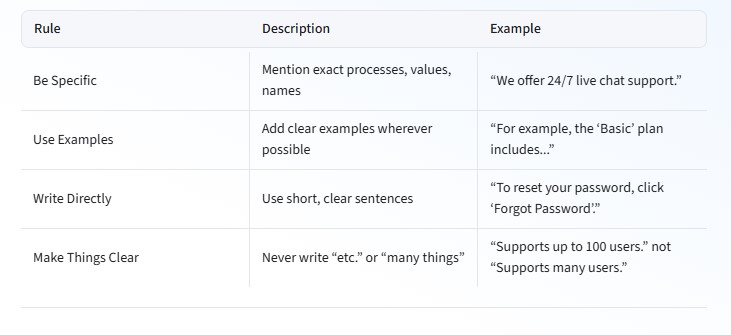
📏 Writing Style Guidelines
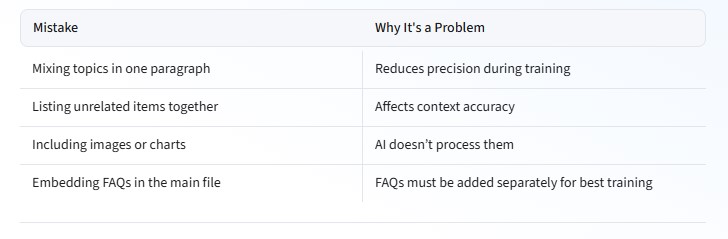
What to Avoid #
 What to Do When You’re Not Sure About Format #
When unsure about structure, follow this fallback rule:
“One paragraph = One point = Under 800 characters”
If you have longer paragraphs, the system will break into parts them. Just make sure they’re well-written.
 How to Make Answers Better #
Keep in mind that each paragraph becomes a reference block. It’s better to have 30 well-written, focused paragraphs than 5 long paragraphs.
Section B: FAQ’s Training #
This section explains how to prepare FAQs in a structured and clear format for training AI bots or building knowledge bases. It ensures your questions and answers are professional, consistent, and easy for the system to understand.
Structure & Format Guidelines: #
- Question Format:
-
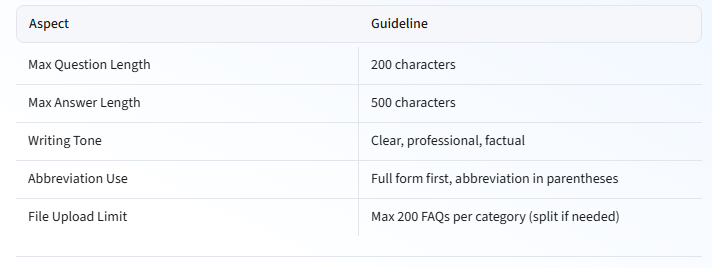
- Maximum length: 200 characters
-
- Always write the full question clearly (not just a keyword or phrase)
-
- Avoid starting with lowercase or always write the full form first
- Answer Format:
-
- Maximum length: 500 characters
- Use complete, grammatically correct sentences
- Keep it direct, factual, and useful
 Quick Summary Table: #
What to Avoid: #
-
- Using only abbreviations (e.g., “CEO”) without explanation
- Mixing more than one question or topic in a single entry
- Using vague or generic questions
- Submitting over 200 FAQs in one CSV without splitting
- Including emojis, incomplete sentences, or slang
Examples of Good and Bad Practices: #
-
- Who is ceo of sml isuzu?
- Who is the Chief Executive officer of sml isuzu?
- Who is the Chief Executive Officer (CEO) of SML Isuzu?
 Two Ways to Train Using FAQ: #
1. Type Manually in Dashboard #
You can directly enter questions and answers into the dashboard interface.
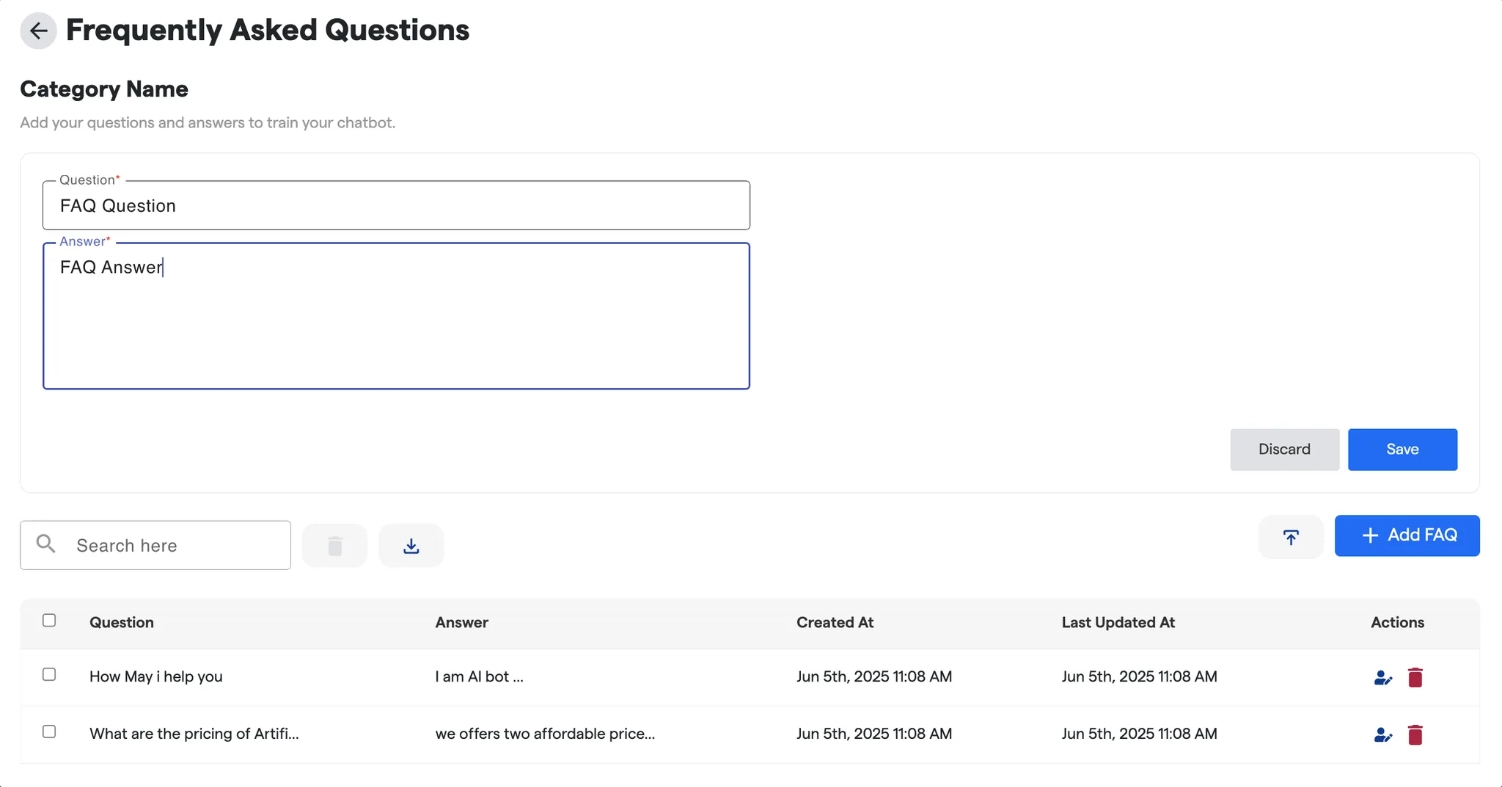
2. Upload via CSV File #
Use a .csv file in the following format to upload multiple FAQs at once:
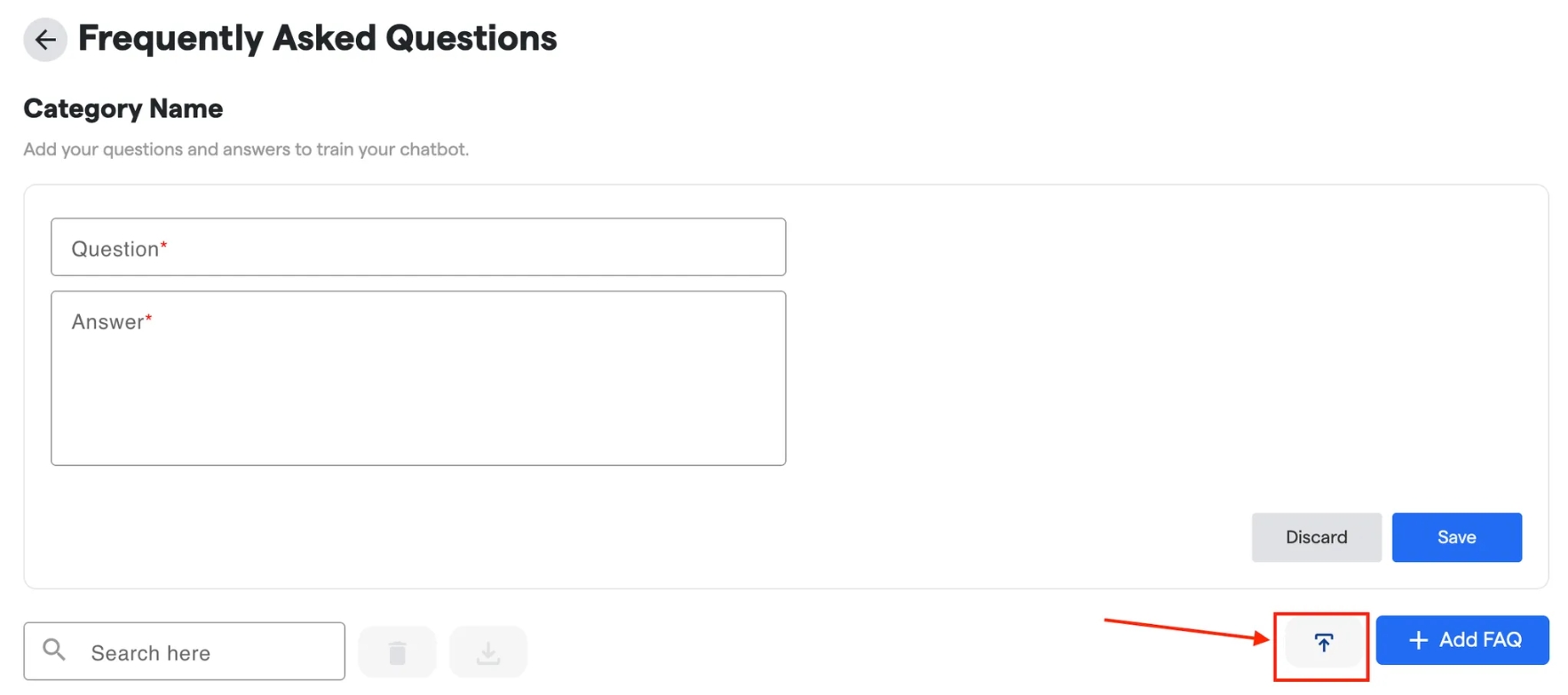
The format of the CSV file should be as such:
Question – Answes
What is Flowmatix? – Flowmatix is a….
What is the use of Flowmatix? – Flowmatix can be used for….
 Limitation on Number of FAQs per Category: #
- Upload a maximum of 200 FAQs per category per file.
- For more than 200 FAQs, split them into multiple CSV files or categories.
This ensures faster processing and avoids system errors.
Here’s a suggested FAQ section to add at the end of your document:
Section C: Website Training #
Structure & Format Guidelines: #
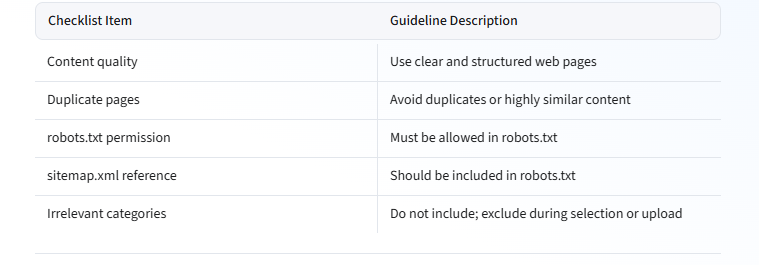
- Use Webpages With Good Content: Pages should have informative, structured, and complete content. Avoid empty, template-only, or irrelevant pages.
- Avoid Duplicate or Repeated Pages: Each page must have unique value. No duplicates or near-duplicates.
- robots.txt Must Allow Scraping: Confirm that the URL is not blocked by
robots.txt. Scraping is only allowed if permitted. - Add sitemap.xml in robots.txt: Make sure your
robots.txtincludes asitemap.xmllink. This helps bots find your important pages faster. - Skip Unnecessary Categories: Avoid submitting categories that are not helpful to the chatbot’s goal.
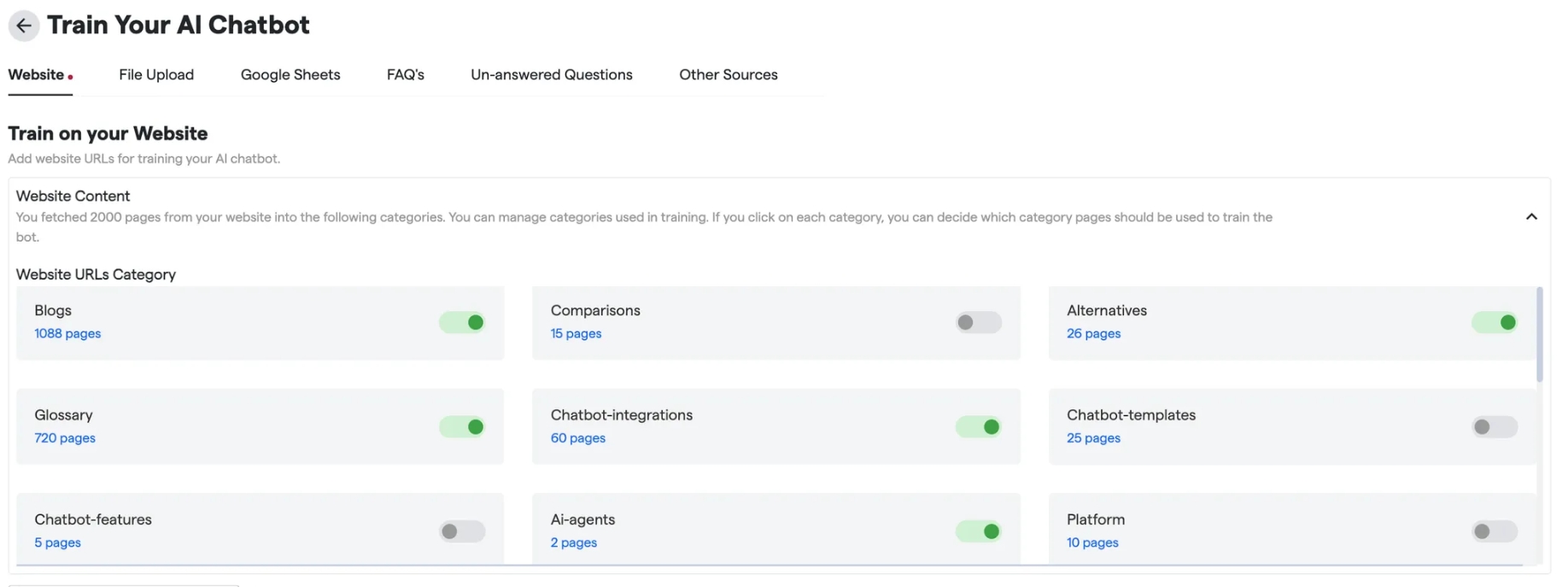
Tip: During the training setup, you can exclude irrelevant categories manually.
Quick Summary Table: #
What to Avoid: #
-
- Pages with little or poor-quality content
- Pages blocked in
robots.txt - Duplicate pages with only minor differences
- Pages unrelated to the bot’s function or scopeCopy
Don’t include extra pages or categories that are not useful for the chatbot.
- Example: Exclude categories like “Chatbot Templates”, “Chatbot Features” , “Platform Features” etc., as they are not relevant to the current use case.
Section D: CSV and Google Sheets #
Structure & Format Guidelines #
General Rules #
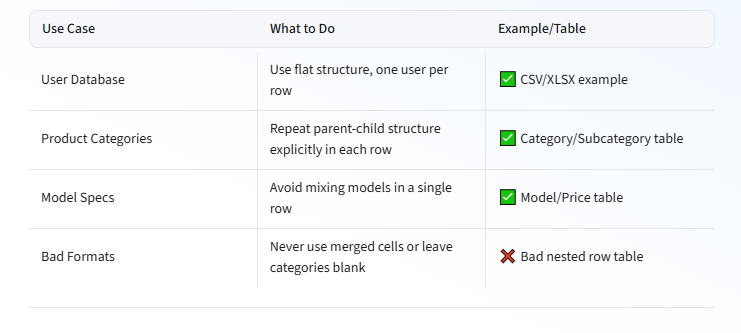
- Use Flat Tables: Each row should be one complete record.
- No Merged Cells: Avoid merged headers or cells.
- Label Every Cell: No empty cells where values should be explicitly stated.
- Avoid Contradictions: All column data must logically align.
- Be Consistent: Keep column types and formats uniform.
 File-Specific Formatting #
CSV Files (Flat Table Format)Copy
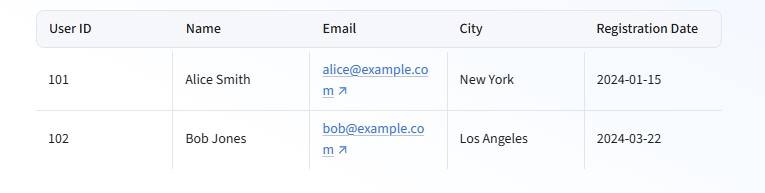
User ID,Name,Email,City,Registration Date
101,Alice Smith,alice@example.com,New York,2024-01-15
102,Bob Jones,bob@example.com,Los Angeles,2024-03-22
-
- Comma-separated, no nested headers
- Each column = one field/property
- Avoid trailing commas or inconsistent row lengths
XLSX & Google Sheets #
Ideal Format
Bad Format (Merged/Grouped Headers)
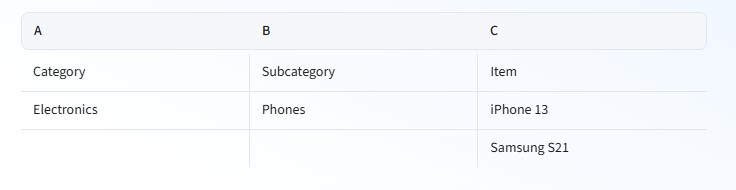
Corrected Format

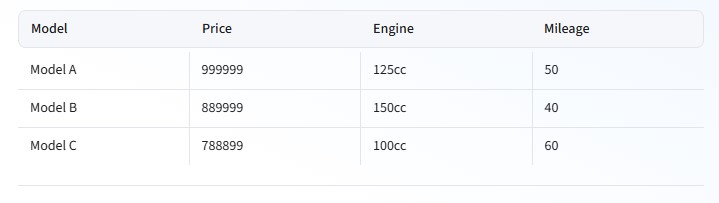
Good Table Format (Simple and Clean)
Use a clear, single-record-per-row format to keep data clean and ready for training:
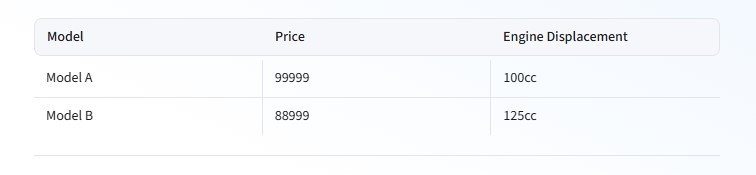
Bad Format Example – Confusing Data in Same Row
Avoid mixing multiple products or entities in one row:
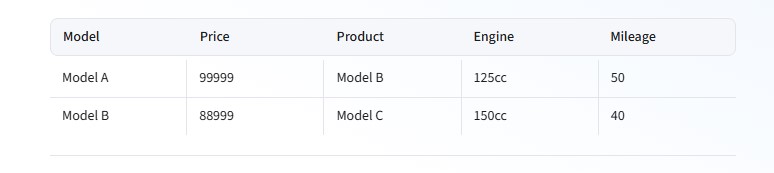
Fixed Format – One Row per Product
Every product now has its own row, with all corresponding data:
 Writing Style Guidelines for Tables #
-
- Use clear column headers (e.g., “User ID” not “UID”)
- Fill all values—no blanks in categories/subcategories
- Repeat parent values for child entries instead of leaving cells empty
- Use consistent date formats (e.g., YYYY-MM-DD)
- No contradictory data (e.g., conflicting models/prices in same row)
- Avoid multiple entities per row
 Quick Summary Table #