


This section contains the Leads and Chat API references
Get the essentials first! #
To use the Flowmatix APIs, You need to insure that you have following details with you.
A. UUID – You can get the UUID from the local web session storage as show in the image below:
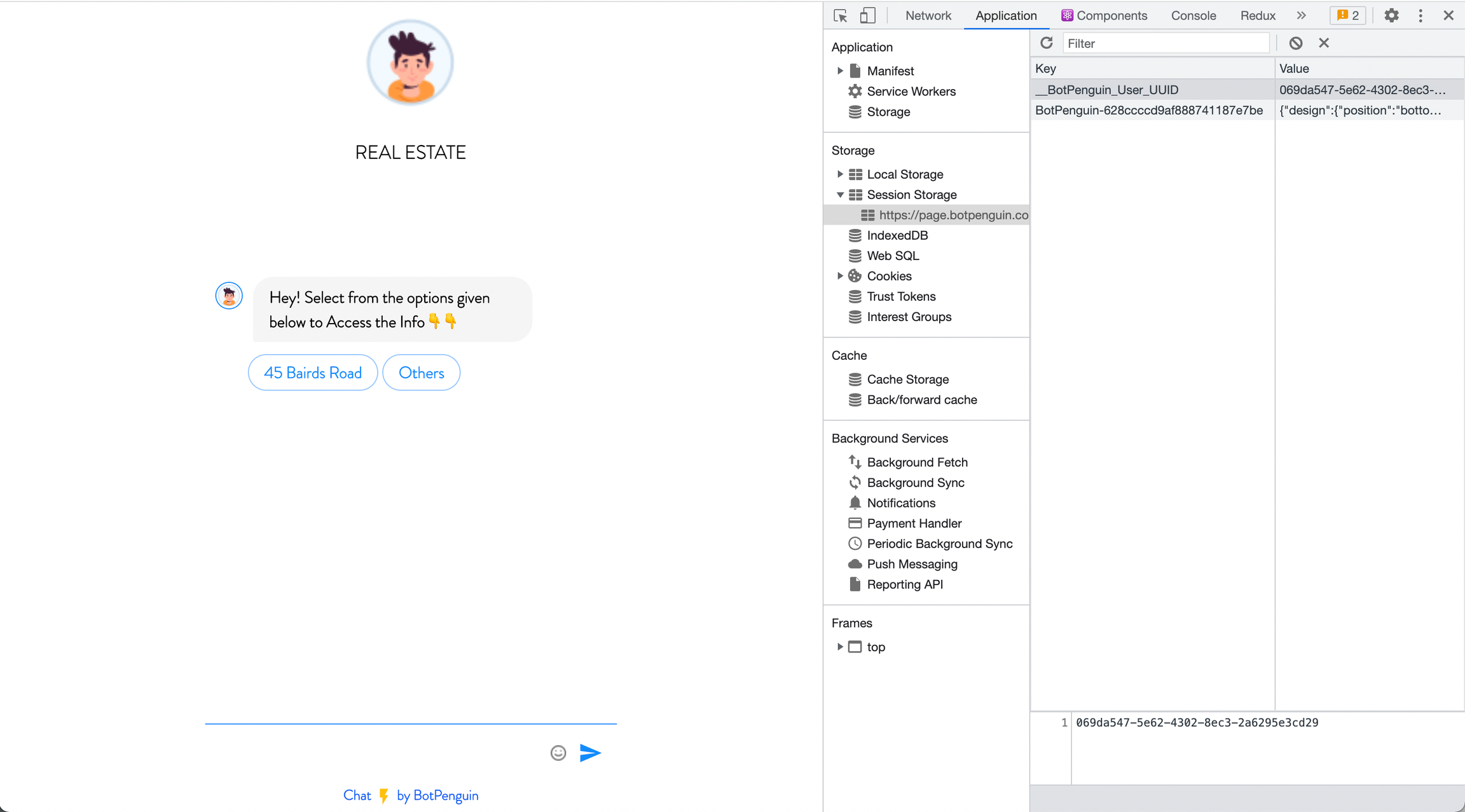
B. Bot ID & User ID: One can get the Bot ID and User ID from your Bot Script or Bot page URL. Below is the sample Example.
For Chatbot page URL
    // Chatbot Page URL Structure

https://page.flowmatix.ai/BotId/CustomerId

// The first value after .ai is the BotId and second value is the CustomerId.
For Chatbot Script
    // Chatbot Script Structure

<script id="flowmatix-messenger-widget" src="https://cdn.flowmatix.ai/flowmatix.js" defer>BotId,CustomerId</script>

// The first value after defer> is the BotId & second value is the CustomerId.
C. Auth Token: We haven’t automated everything yet. Please contact our support team to get the same.
Now you are ready to run the POC
API References #
Please use the below APIs in order to play with your leads and chat data.
Create a lead in the Flowmatix #
As soon as any user opens up the Bot, It creates one UUId; pass the same along with the other required details to create and update the lead’s details.
API to update a chat/lead data #
PUT https://api.v7.flowmatix.ai/inbox/direct/lead
As soon as any user opens up the Bot, It creates one UUId; pass the same along with the other required details to create and update the lead’s details.
Headers #
| Name | Type | Description |
|---|---|---|
| x-bp-token* | String | API Token |
Request Body #
| Name | Type | Description |
|---|---|---|
| uuid* | String | Unique ID of a chat user |
| botId* | String | Unique ID of the bot |
| customerId* | String | Unique ID of the customer account |
| agentId | Boolean | Unique ID of the agent assigned |
| name | String | Name of the lead |
| String | Email of the lead | |
| phone | String | Phone number of the lead |
| dialCode | String | Dial Code including “+” sign |
| notes | Array<{title: string, description: string}> | Additional notes for the chat |
| status | String | Valid status for the chat. Available values: ‘OPEN’, ‘INPROGRESS’, ‘REVIEW’, ‘ONHOLD’, ‘DEPENDANCY’, ‘CLOSED’ |
| picture | String | A valid image HTTP URL |
| tags | Array<String> | Additional tags for the chat |
| attributes | Array<{key: string, value: string}> | Custom attributes for the chat |
{
    "success": true,
    "message": "ok",
    "code": 200
}
Get leads listing and Its meta data #
To get the listing of the leads and its meta data, Hit the below API with mandatory details.
API to get listing of chats/leads #
GET https://api.v7.flowmatix.ai/inbox/direct/chats
To get the listing of the leads and its meta data, Hit the below API with mandatory details.
Query Parameters #
| Name | Type | Description |
|---|---|---|
| botId* | String | Unique ID of the bot |
| customerId* | String | Unique ID of the customer account |
| page* | String | Page number |
| type* | String | “lead” to fetch only leads, “non-lead” to fetch non lead chats |
Headers #
| Name | Type | Description |
|---|---|---|
| x-bot-token* | String | API Token |
❓ Got any questions? #
If you have any questions, you can look into our repository of FAQs, most likely, you will find your answer here, If not, write us at support@flowmatix.ai.