


This page contains the Information on how can you send WhatsApp Notifications from your platform using the Flowmatix APIs
Before we start, Let’s understand the basic workflow.
Workflow for sending WhatsApp notifications #
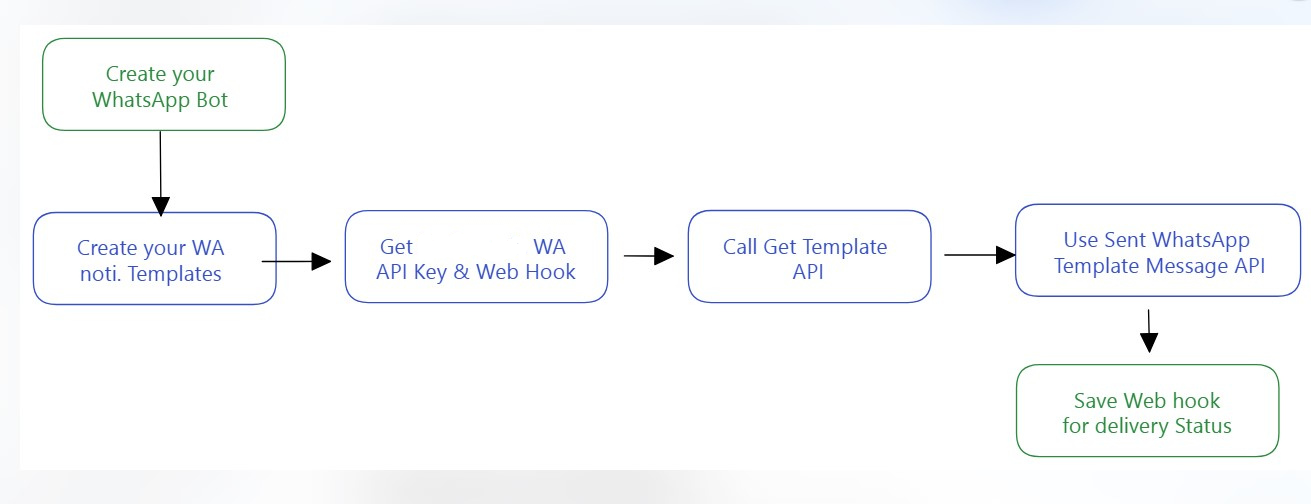
Workflow for sending WhatsApp notifications
Setting up WhatsApp Notifications #
To create a notification bot with Flowmatix, follow these steps:
Step 1: Get Your API Key
- Start by obtaining your API key for integration.
Step 2: Setup the WebHook Endpoint
- Configure the WebHook endpoint where your bot will send and receive messages.
Step 3: Create Notification Templates
- Ensure you’ve created the required notification templates that your bot will use for messaging.
Step 4: Retrieve Notification Templates
- Call the “Get Template API” to retrieve all the templates you’ve created.
Step 5: Send Messages
- Utilize the “POST WhatsApp Template API” to send messages using the templates.
Step 6: Configure Webhook Handling
- Implement the necessary code to handle the webhook on the configured endpoint. This is where your bot will receive and process incoming messages and notifications.
Step 7: You’re Done!
- With these steps completed, your notification bot is ready to send and receive messages using your templates, ensuring efficient and effective communication with your audience.