


Prerequisites: #
- Enable custom app uploading in Teams.
- Ensure that your app is running and accessible using HTTPs.
Upload Flowmatix #
Depending on how you configured your app’s scope, you can sideload your app to a team, chat, meeting, or personal use.
- Log in to the Teams client with your Microsoft 365 development account.
- Select Apps > Manage your apps and Upload an app.
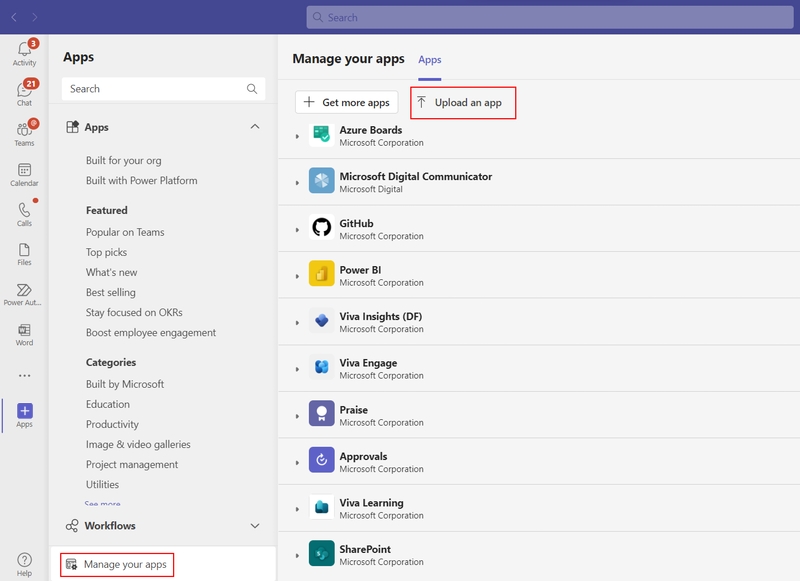
- Select Upload a custom app
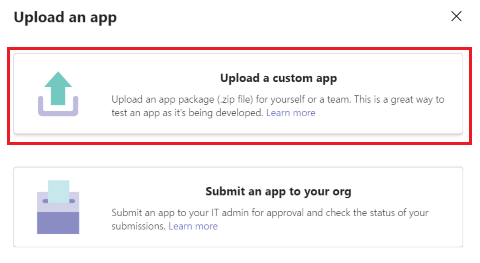
- Select your Flowmatix package .zip file.
- Add your app to Teams as per your requirement:a. Select Add to add your personal app. b. Use the dropdown menu to add your app to a Team or chat.
Troubleshoot #
If your app fails to sideload or encounters any issues with uploading, check the following options:
- Ensure that you’ve followed all the instructions for creating your app package.
- Contact us for any queries or problems. https://flowmatix.ai/contact-us/